
Install the plugin
You do not need to download anything by hand. QGIS installs the plugin for you, from inside QGIS, in about a minute.
First check your QGIS version: Help → About. You need QGIS 3.44 or newer. QGIS 4 works too. If yours is older, update QGIS first — the plugin will not run on earlier versions.
Install it from inside QGIS
This is the way to do it. Do this and QGIS will also tell you when a new version is out, which it cannot do for a plugin you installed from a file.
- Open QGIS.
-
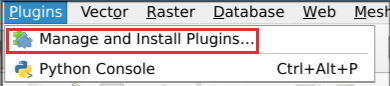
Go to Plugins → Manage and Install Plugins… in the menu bar.
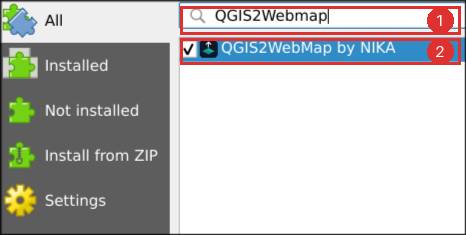
- Select All in the list on the left of the window that opens.
- Type
QGIS2WebMapinto the search box at the top. -
Click QGIS2WebMap by NIKA in the results.
-
Click Install Plugin, at the bottom right, and wait for it to finish.
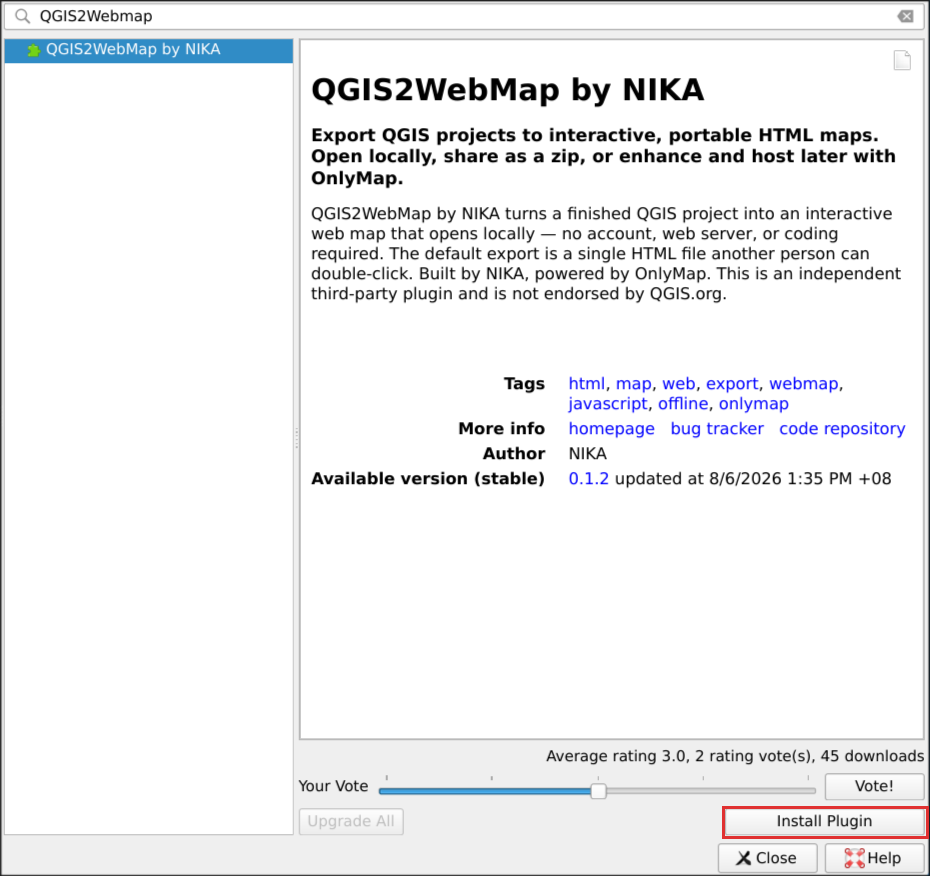
Close the window. You should now have a Web → QGIS2WebMap by NIKA → Create web map entry in the menu bar, and a new button on the toolbar.
That is the whole installation. Make your first map.
Nothing found when you search? Make sure you clicked All and not Installed, and check the spelling — it is one word,
QGIS2WebMap. You can also search forOnlyMap. If the list is empty altogether, your QGIS cannot reach the plugin repository; see troubleshooting.
The plugin’s page in the repository is plugins.qgis.org/plugins/nika_onlymap_exporter, if you want to read it before installing. You do not need to visit it.
Keeping it up to date
QGIS checks for plugin updates on its own and tells you when one is available. When it does, go back to Plugins → Manage and Install Plugins → Upgradeable and click Upgrade Plugin. Nothing you have set up is lost.
If your organisation blocks the plugin repository
Some workplaces block QGIS from reaching plugins.qgis.org. Only then, install from a file instead:
- Download
qgis2webmap-<version>.zipfrom the releases page. - In QGIS: Plugins → Manage and Install Plugins… → Install from ZIP.
- Click the … button, choose the file you downloaded, then click Install Plugin.
This works identically, with one drawback: QGIS will not tell you when a new version is released, so you have to come back and check.
One more download, the first time you export
The first time you preview or export a map, a window appears asking permission to download the OnlyMap runtime. This is expected. Say yes.
It is about 4.5 MB and it happens once on this computer, ever.
The runtime is the piece of code that draws the map in a web browser. A copy of it goes inside every map you export, and that is precisely what lets the person you send a map to open it with no internet connection and nothing installed. It is a separate NIKA product with its own licence, so the plugin shows you that licence and asks before it fetches anything, rather than downloading quietly.
After that one download, everything works offline, on every project, for good. Exporting itself never touches the network.
Start with the dialog, not with Processing. The Export to OnlyMap web map Processing algorithm cannot show you a licence — there is nobody to show it to during a batch run — so on a computer that has never installed the runtime it stops straight away and points you here. Export once from Web → QGIS2WebMap by NIKA and the algorithm works from then on.
The plugin is free and open source; the runtime is not, which is why it is not included in the plugin and why you are asked before it is fetched.
On a computer with no internet access
Some organisations block outside downloads. To install the runtime by hand:
- On a machine that does have access, download the package from npm and unpack it.
- Copy the
distfolder — you needonlymap.standalone.jsandonlymapjs.css— onto the offline machine. - Set the environment variable
ONLYMAP_RUNTIME_DIRto that folder before starting QGIS.
The plugin uses a runtime it finds that way and never asks to download.
Behind a proxy
The download goes through QGIS’s own network settings, so a proxy configured in Settings → Options → Network is used automatically. If the download fails, check there first.
Building it yourself
Only if you want to run an unreleased version. Nobody using the plugin needs this.
git clone https://github.com/NikaGeospatial/qgis2webmap.git
cd qgis2webmap
python scripts/package_plugin.py
The zip lands in dist/ as qgis2webmap-<version>.zip, and installs through
Install from ZIP above.
If it does not appear
- Check Plugins → Manage and Install Plugins → Installed and confirm it is ticked.
- Look at View → Panels → Log Messages, tab
QGIS2WebMap, for an error.
The plugin never closes QGIS. The only thing it ever installs is the OnlyMap runtime described above, once, after asking. If QGIS closes unexpectedly, that is a bug worth reporting.